


Milwaukee® Pipeline Inspection
3.514.00 Reviews
App Specs
- Version
- 2.1.2
- Updated On
- License
- Free
- Downloads
- 10,000+
- Developer
- Milwaukee Tool
- Categories
- House & Home
- Platform
- Android
Screenshots

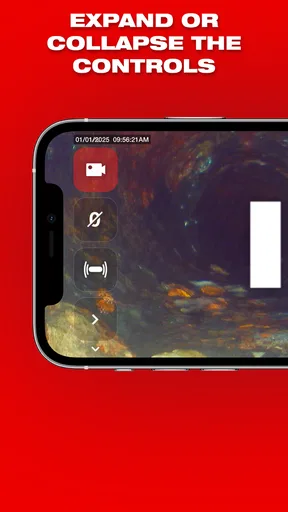
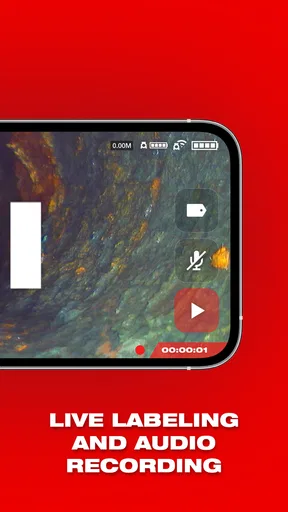
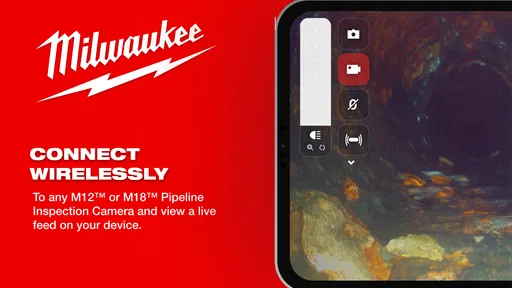
 Analysis by AppCompare
When I look at the Milwaukee® Pipeline Inspection app, I see a focused tool rather than a general home-maintenance companion. It belongs to the House & Home category, is free to use, and comes from Milwaukee Tool. Its purpose is closely tied to the Milwaukee pipeline inspection equipment, so the value is not in filling a phone with broad plumbing advice. The value is in giving a technician a mobile interface for inspection work.
That distinction matters before you install it. I would not recommend it to someone who simply wants to identify a blocked sink or learn basic pipe repairs. I would recommend taking a closer look if your work involves inspecting pipelines and you already use, or plan to use, Milwaukee’s inspection system. In my experience, specialist apps are most useful when they shorten the distance between a physical tool and the person making a decision on site.
Why the inspection-system connection matters
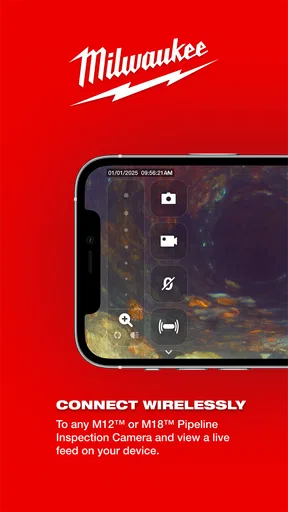
The central capability here is straightforward: the app is designed around Milwaukee’s pipeline inspection system. That makes it different from ordinary home-improvement apps, which usually concentrate on checklists, how-to articles, shopping lists, or general project planning. This one is better understood as part of a professional inspection workflow.
The practical effect is that your phone can become part of the inspection process instead of remaining separate from it. Rather than treating the camera, display, and controls on an inspection device as an isolated experience, the app gives the mobile side of the job a more deliberate role. That can make a difference when the person holding the equipment is not the same person who will explain the condition of the pipe to a customer, supervisor, or property owner.
I especially like this kind of focused design when a job involves moving between a work area and a vehicle, office, or customer-facing space. A phone is easier to carry and discuss around than a larger piece of equipment. It also feels more natural when you need to show someone what you are seeing without handing over the entire inspection setup.
There is an important limitation, though. The app should not be treated as a standalone pipeline detector. Its relevance depends on the Milwaukee inspection system around it. If you do not have compatible Milwaukee equipment, the app is unlikely to become useful merely because it is free. That is the first trade-off, and it is more important than the download itself.
What the capability changes on a real job
In a typical inspection, the difficult part is not only seeing inside a line. It is turning that observation into a clear conversation. A technician may need to explain whether the issue appears local, whether further work is justified, or why a repair cannot be planned from a quick visual check. A connected mobile workflow can make those conversations less dependent on memory and hand gestures.
Worth Reading Before You Choose

EA SPORTS FC Mobile 26 Is a Bigger Football Game, but It Takes Time

Flipboard Shows What News Apps Must Do Beyond the Feed

Switching to Android Auto Means Rethinking Your Driving Routine

Google Calendar Makes a Crowded Week Easier to Manage

Ludo King Makes the Most of the Minutes Between Plans

Baby Panda World Brings Quick Play to Modern Phones, but Its Game Library Feels Busy
For me, the strongest benefit is context. When an inspection view is available where you already manage calls, messages, and notes, it becomes easier to keep the visual evidence connected to the job in your mind. That does not replace professional judgment, but it can reduce the chance that an important observation is forgotten between the inspection and the explanation.
This is also where the app’s narrow purpose becomes a strength. It does not appear to be trying to compete with broad maintenance platforms. Instead, it supports one type of work and keeps the focus there. A plumber, drain specialist, or facilities worker who regularly handles pipeline inspections may appreciate that concentration more than a crowded app filled with unrelated household features.
How I would use it during an inspection
I would begin by installing it on a compatible Android device and checking that the phone meets the stated minimum of Android 7.0. The current version is 2.1.2, so I would also make sure the app is updated before taking it into a serious job. That simple preparation matters with equipment-linked software: a phone that is technically capable but poorly prepared can become the weakest part of an otherwise reliable workflow.
Once at the site, I would keep the phone positioned where the technician can glance at it without losing awareness of the work area. The app’s usefulness is likely to be highest when it helps you observe and communicate, not when it forces you to spend the inspection staring at menus. I would treat the screen as an aid to the physical inspection system, not as a substitute for looking after the cable, camera, access point, and surrounding workspace.
A realistic example would be a service call involving a recurring drainage problem in a small commercial property. The technician reaches the relevant access point, performs the inspection, and uses the mobile side of the system while discussing the findings with the property manager. Instead of giving a vague explanation such as “there is something further down the line,” the technician can keep the conversation tied to what the inspection is showing at that moment.
That workflow is useful because it separates two tasks that are often mixed together: operating the inspection equipment and explaining the result. If one person is doing both, a mobile interface may make the handoff between those tasks smoother. If a second person is present, the app can help that person follow along without constantly interrupting the operator.
My practical tip would be to decide in advance what the inspection needs to answer. Are you trying to locate a problem, understand its apparent condition, or explain why a follow-up visit is needed? The app cannot make an unclear objective clear by itself. A focused question makes the inspection more efficient and helps you judge whether the mobile display is genuinely helping.
The best setting for this app
The strongest scenario is professional fieldwork where inspection information needs to move quickly from equipment to people. That includes service calls, property maintenance, drain work, and situations where a customer wants an understandable explanation before approving the next step. The app makes the most sense when the inspection system is already part of the team’s tools and the phone adds convenience or visibility.
Imagine a technician arriving at an older building after a complaint about repeated backups. The customer is understandably nervous about opening walls or excavating without knowing what is wrong. During the inspection, the technician can use the Milwaukee system and involve the customer in the explanation rather than relying entirely on technical language. Even when the app does not solve the physical problem, it can support a more informed decision about what should happen next.
Another good scenario is training or supervision. A newer worker may understand the physical operation of the equipment but still need help interpreting what matters in the inspection. A mobile view can make it easier for a supervisor to observe the same process and give guidance. I would still avoid presenting the app as a diagnostic authority; the experienced person remains responsible for reading the situation correctly.
It can also help when a job moves between people. A technician may perform the inspection while an office worker or project manager handles the customer’s questions. Keeping the inspection experience accessible on a familiar mobile device can reduce the need for everyone to crowd around the main equipment. That is a small operational improvement, but small improvements are often what make specialist tools worthwhile over a full day of calls.
Where the usual alternatives are better
For a homeowner, the usual alternative is not another pipeline inspection app. It is often a search engine, a plumbing guide, a video tutorial, or a call to a professional. Those options are better for deciding whether a simple visible blockage can be cleared safely or whether a specialist should be contacted. This Milwaukee app is not the right first step for routine household troubleshooting.
For a professional who does not use Milwaukee inspection equipment, a manufacturer-neutral field-service platform may be more practical. Such a platform can be built around scheduling, customer records, estimates, invoices, and job documentation across different brands. Milwaukee’s app is more specialized, so its usefulness may be deeper within its intended equipment ecosystem but narrower outside it.
A dedicated inspection monitor may also be preferable in harsh or awkward working conditions. A phone is convenient, but convenience does not automatically make it the best screen for every environment. If the operator needs rugged controls, a fixed viewing position, or a display that can remain dedicated to the inspection, the equipment’s own interface may be the better choice. I see the app as an additional way to work, not a universal replacement for the hardware.
The trade-offs I noticed
The first trade-off is dependency. The app’s purpose is closely linked to Milwaukee’s Pipeline Inspection System, which means its usefulness is not independent of the hardware. That is perfectly reasonable for a tool companion, but it changes how I judge it. A free download does not mean a free inspection solution, and I would not install it expecting the phone alone to provide the complete experience.
The second trade-off is audience. The app has an Everyone content rating, which makes it broadly suitable from an age-classification perspective, but that does not make the workflow beginner-friendly in the same way as a household tutorial app. Someone can open it safely and still find that the real learning curve comes from understanding pipeline inspection itself.
The third is adoption. With an average rating of 3.5 from around 31 ratings and 14 reviews, the public response looks mixed rather than overwhelmingly positive. I would not use that alone to reject the app, especially because specialist equipment apps often serve a smaller audience than mainstream home apps. Still, it is a sensible reason to test the workflow on a noncritical job before making it central to a team’s process.
The app has passed the early stage of being available for a while, having been released in February 2021, but a mature release date does not guarantee that every phone, accessory, or work habit will feel equally smooth. I would evaluate it with the actual Milwaukee inspection setup, the actual phone model, and the actual conditions in which the team works. That is more useful than judging it from the app icon or store summary.
Another point is attention. A phone can introduce distractions at exactly the wrong moment: calls, notifications, low battery, gloves, rain, or a screen that is difficult to read in bright light. My advice would be to configure the phone for work before starting, keep the interaction minimal during the inspection, and avoid making the app the only place where important job information exists.
Small workflow choices that improve its value
One useful approach is to use the app as a communication bridge rather than merely a control surface. Before showing anything to a customer, I would first form my own technical view of the situation. Then I would use the mobile display to support the explanation in plain language. This prevents the screen from becoming a substitute for professional interpretation and makes the conversation more trustworthy.
A second tip is to establish a handoff routine. If one worker operates the inspection equipment and another speaks with the customer, agree on who controls the view, who asks questions, and when the phone is passed around. Without that routine, a connected workflow can create more interruptions than it removes. With it, the app can help several people stay aligned.
A third insight is that the app may be most valuable before and after the dramatic moment of finding a problem. During the inspection, everyone naturally focuses on the live view. Before that, the phone can help the team prepare for how the result will be explained; afterward, it can help keep the conversation anchored to the inspection rather than to assumptions. The real gain is often better continuity, not a flashy feature.
I would also test the app in the exact position where it will be used. A phone held at waist height, mounted near the operator, or passed to a customer creates very different experiences. Check visibility, reachability, and whether the operator can keep working safely. This is especially important because an app that feels excellent on a desk may feel awkward beside an access point.
Who should install it
I think the best audience is a Milwaukee equipment owner or field team that performs pipeline inspections often enough for a smoother mobile workflow to matter. The app is also worth considering for supervisors who need to participate in inspections without standing directly over the operator. In both cases, the benefit comes from connecting people to the inspection process more easily.
It may also suit a small service business that wants customers to understand why a recommendation is being made. A clear explanation can reduce confusion and help separate necessary follow-up work from guesswork. The app cannot guarantee customer confidence, but a shared view can make a technical conversation less abstract.
I would skip it if you are looking for general plumbing instructions, household repair reminders, or an all-in-one job-management system. I would also hesitate if your team uses several brands and wants one neutral app across all inspection tools. In that case, flexibility may matter more than a close connection to one manufacturer’s equipment.
On iOS, I would check the relevant device requirements before planning a deployment, while Android users should remember that the stated minimum is Android 7.0. The app is free, but the surrounding equipment and the time needed to train staff are the real costs to consider. That is why I would judge it as part of a work setup rather than as an isolated download.
My final view after weighing the fit
Milwaukee® Pipeline Inspection is a specialized House & Home app with a clear purpose: support the mobile side of Milwaukee’s pipeline inspection workflow. I appreciate that focus. It is not pretending to be a general home-repair library, and that makes it easier to understand who should care about it.
Its strongest effect is practical communication. When the right equipment is already in use, bringing the inspection experience closer to a phone can help technicians, supervisors, and customers follow the same situation. The app is most convincing on service calls where seeing the inspection and discussing the next step need to happen together.
Its weaknesses are just as clear. It depends on the relevant Milwaukee system, it is not a standalone answer for homeowners, and the modest public rating suggests that I would test it carefully before committing a whole team to it. Those are not reasons to dismiss it; they are reasons to match it with the right job.
With a free price, an Everyone rating, over ten thousand installs, and a current version of 2.1.2, it is easy enough to try when your equipment and phone are compatible. My recommendation is simple: install it if pipeline inspection is already part of your work and you want a more connected way to view and explain the process. If your needs are broader or more casual, a general home-maintenance app or a brand-neutral field tool will probably serve you better.
Pros
- Designed for professional pipeline inspection workflows
- Helps organize inspection data in one dedicated mobile app
- Supports fieldwork away from a desktop computer
- Can improve consistency when recording pipeline observations
- Useful for teams already using Milwaukee inspection equipment
Cons
- May offer limited value without compatible Milwaukee hardware
- Professional features may be excessive for occasional users
- Field performance can depend on device battery and storage
- Teams may need training before adopting the workflow
- Compatibility with older phones or tablets may vary
FAQs for Milwaukee® Pipeline Inspection
What is Milwaukee® Pipeline Inspection used for?
Milwaukee® Pipeline Inspection is designed to support professional inspections of pipelines, drains, conduits, and other hard-to-reach areas when used with compatible Milwaukee inspection equipment. It can help users view live camera footage, examine interior conditions, identify blockages or damage, and document findings more efficiently than relying only on manual inspection methods. It is primarily intended for trade and industrial workflows rather than casual household use.
Does Milwaukee® Pipeline Inspection work without Milwaukee inspection hardware?
The application may have limited usefulness without compatible Milwaukee inspection equipment. Its main purpose is to connect with and display information from supported Milwaukee pipeline inspection systems, so users should verify hardware compatibility before downloading or purchasing equipment. Compatibility can depend on the specific camera, control unit, operating system, and connection method. Checking Milwaukee’s official product documentation is recommended before relying on the app for professional work.
What features can I expect when using the app?
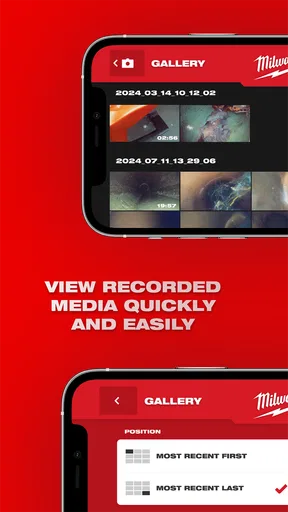
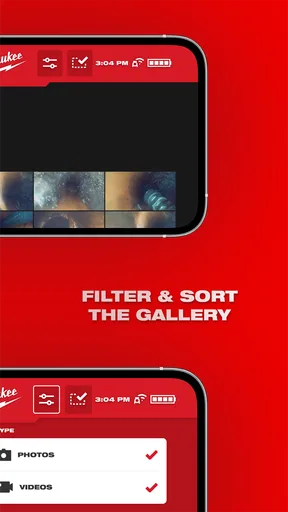
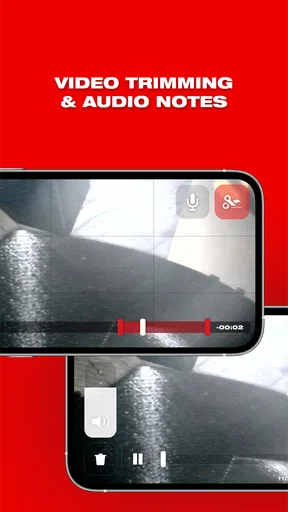
Depending on the connected Milwaukee system, the app may provide live viewing of the inspection camera, image or video review, controls for navigating recorded material, and tools for documenting inspection results. Some functions can vary by hardware model and software version. Users should not assume every feature is available on every device, particularly when using older inspection equipment or a phone with limited operating-system support.
Is Milwaukee® Pipeline Inspection suitable for professional contractors?
The app is aimed mainly at professionals who inspect plumbing lines, pipelines, drains, ducts, or similar confined spaces. It can make field inspections more convenient by placing viewing and documentation functions on a compatible mobile device. However, the app should be considered part of a larger inspection system, not a replacement for proper training, safety procedures, lighting, locating equipment, or professional judgment when evaluating damage and deciding on repairs.
What should I check before downloading Milwaukee® Pipeline Inspection?
Before downloading, confirm that your Android or iOS version is supported and that your Milwaukee inspection camera or control unit is compatible with the application. You should also review required permissions, available storage, wireless or wired connection requirements, and whether the app is available in your region. For dependable field use, keep the app and device firmware updated and test the connection before beginning an important inspection.


